Table of Contents
Adding Items Without Prices, Then Pricing Later
Some stores find it faster and/or more convenient to enter items without their prices, then come back to the items later to price them. The Edit Item Prices routine provides a convenient method for doing so.
To Edit Item Prices In Bulk
- Select Activities > Inventory > Price Items.
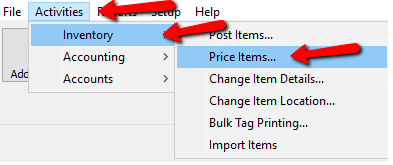

The Item Price Editor screen will open.

Item Price Editor Fields
- Item # : Displays the Account - Item number.
- Name : Displays the Last name on the account.
- Title : Displays the Title of the item.
- Description : Displays the Description of the item.
- Attributes : Will list Attributes associated with the item.
- Retail Price : Shows the Retail Price if purchased in a store.
- Price : The field that we will be entering in the Price of the item.
- Save button : Once all the changes have been made, press the Save button.
- Cancel button : If you need to cancel the changes of the current item you are editing, press the Cancel button.
- Print & Close button : Closes the Price Editor and Prints all the tags for the items we added prices to.
- Refresh button : Pressing the Refresh button will update the list and clear out any items that have had a price added. It will not close out of the Price Editor.
- Close button : Closes out the Price Editor
- When done, select the Save button, then the Close button.
If you are considering using this routine, see the section entitled Pricing Guide for an alternative approach to entering prices.
Next Article In Section
Click the following link to move to the next article in this section:
Keyboard Shortcuts
Related Topics
Adding Items Without Prices, Then Pricing Later How to Enter Sales Faster How to Enter Items Faster Keyboard Shortcuts Using the Wishlist Wishlist Cross-Reference report Looking for Wishlist Matches While Adding Items Wishlist Overview Find an Item from within an Account Finding Items with a Status of Needs Info Find an Item (in any account) Using Item Lookup