Table of Contents
One of a Kind Item Entry Window
The Consignment fields are described below.
The lower part of the Item Entry window displays a list of items entered. This is known as the Item Entry Grid. This Grid is empty when the Item Entry window is first displayed. The Grid only displays those items entered while in the Item Entry display. When you exit the Item Entry window the Grid is emptied, but the items entered ARE on file and may be viewed on the Inventory tab.

Notes: The Save button must be selected to save information.
If a field described below does not appear on screen, it may be a Hidden field. To show a hidden field:
- Select the Edit Layout button.
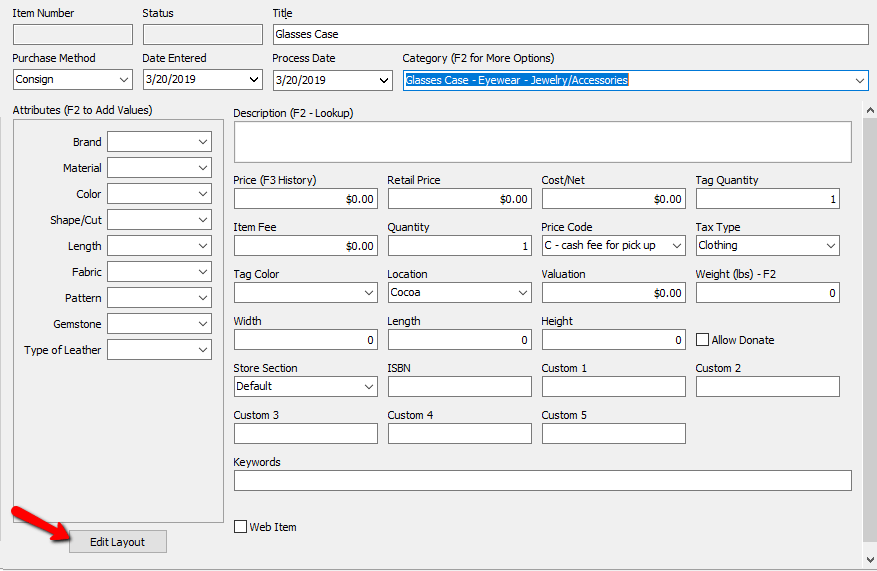
- Right click a blank area in the Item Entry field, and select Edit Layout. Anything hidden will say No in the visible column. To Show a field, highlight the field then click the Show Field button.
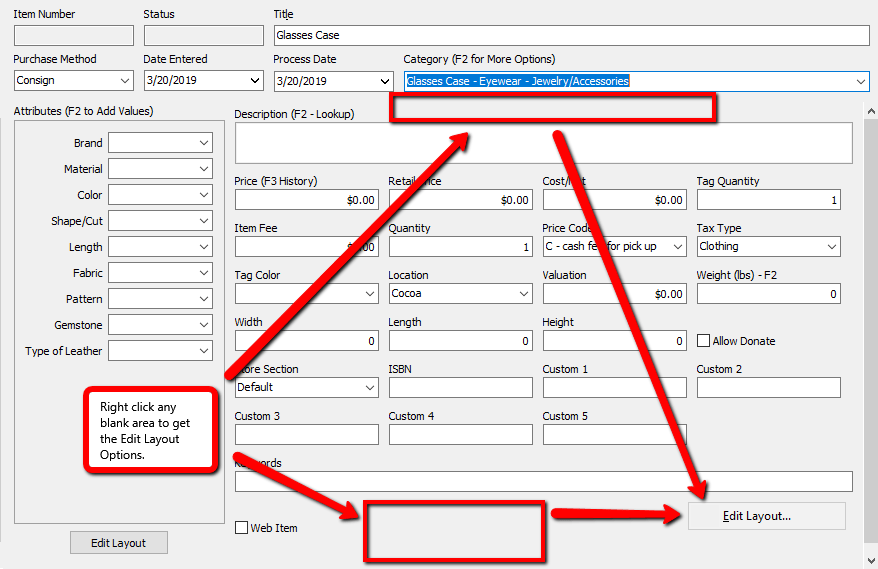


For more information about Editing Layouts, see the section entitled Set Item Entry Field Preferences.
Consignment Item Entry Window Fields

The following fields are the bare minimum requirements for entering items into liberty.
- Purchase Method : There are four choices:
- Consign : Consigned items are items that are added to the inventory module and Payment for consigned items are made only after an item sells.
- Purchase : Purchased items are items that are added to the inventory module and Payment for Purchased items are made at anytime after Item Entry.
- Trade : Trade items are converted into purchased items once the trade has been processed – until then, they cannot be sold through POS. Trade items are added using the Buy/Trade button. See Trade Item Entry Process here.
- Store Inventory.There is no payment for Store Inventory items. These are items brought in from a yard sale, auction, or acquired another way outside the store,
The term Form of Acquisition means the same thing.
Note: Trade items are entered through the Add Trade Items button on the account. See Trade Item Entry Process.
Note: Store Inventory items are items that are considered to be store owned that do have a cost associated with them, however the purchase of these items is considered to be handled outside of Liberty. No transactions are created for Store Inventory items either during item entry or as part of the sale of these items. There will be no information in transactions for store owned items. - Date Entered : Date the item is entered into inventory. Liberty defaults to the system date. Change the date if necessary by typing in a new date.
- Process Date : Date the item is to start its consignment cycle in Liberty. Liberty defaults to the system date. Change the date if necessary by typing in a new date.
Note: Consignment Start can be used to post-dating items into the future so that items with markdowns will not start until the Consignment Date. Example: A consignment store sells certain items based on the seasons. The store is currently taking items in the Spring that will be on the floor for the Summer. The summer season does not start until June 1st. The store will enter the items with a Date Entered as the day they were actually put into Liberty, but the date the consignment starts will be June 1st., the Consignment Start. - Category : The category the item is to be kept in. If on a Category 3 structure, then select the Level 3 Category that best describes this item. Same if on a level 2 or level 1 structure.
To save time and keystrokes Liberty will auto fill the Category field as you type in the Category field.
Alternatively, press F2 and the Select Category dialogCategories Overview will appear, from which you may use the mouse or a combination of letters and arrow keys to choose a Category. In addition you can press the Add button to add a new category.
Please see Categories Overview and Add, Change, and Delete Categories for more information. - Price Code : The Price Code determines how the sale price of an item is split between the store and the client. It also controls automatic markdowns, items fees and other factors that affect the sale of Consigned items.
The following field is required to be able to sell items online. - Web Item Check Box : This will mark the item as a Web item to be sold online. See Liberty Listing Manager for details.
The following fields are assigned by Liberty and cannot be changed by the user. - Item Number : Assigned by the system. Each account starts at item number 1. The next item number can be changed by changing the number in the Next Item Number field Account Info screen.
- Status : Current status of the item. Status types include Available, Not Available, and Needs Info.
The status Available means the item is available for purchase.
The status Needs Info indicates the item is missing important information and cannot be sold until that information is entered. An item without a price, for example, would have a status of Needs Info.
The status Not Available indicates the item has a Disposition of Sold, Donated, Returned (to the client), Being Sold, Layaway, Expired, Ordered Online, etc. - Title : A phrase created by Liberty combining selected fields, most often the Attribute Types, Brand, and Level 3 Category fields. The default syntax is:
{Attribute(s) + Brand + Level 3 Category}
Examples:
Peach Size 10 Ann Taylor Blouse
Oak 60 inch Taylor Table
The purpose is to provide items listed online with an Item Title, and to create a consistent way to reference items within Liberty. In addition to appearing in the Auction Ads and HTML Templates, Titles are used in the Item Lookup, Wish List, and certain reports.
While Liberty automatically creates the Title, you may change it for any reason here in the Item Entry screen.
In addition, the Maintain Category Attributes dialog provides the ability to select which Attributes are, and which are not, included in the Title. Please see the sections entitled Overview of Attributes and Show Attributes in Item Titles for more information.
Note: When an item is edited after it has been saved, the Title must be manually changed. This is because the Title does not automatically update.
The following fields are optional and not required when entering items. - Cost/Net :
- For items with a Purchase Method of Purchase: Enter the amount to be paid to the Seller for the item.
- For items with a Purchase Method of Consign: Leave this field blank (zero) UNLESS you wish to assign a Preset Net amount to the item.
Note: The Cost field is left blank for items entered as Consigned. The Price is calculated by Liberty when the item sells. The only exception to this is when a Preset Net is used. Warning: If you put a Cost/Net in a consigned item, the consignor will get paid that amount no matter how much the item sells for. (example: Cost/Net $5.00, Item Sold for $3.00, Consignor still receives $5.00 leaving the store with a $2.00 loss). - Preset Net : An amount entered into the net field to guarantee the consignor receives a specific amount of money if the item sells instead of an amount based on a percentage of the sale. For example, if a consignor brings in an expensive item, she might say I don’t want you to sell this item unless I get at least $450 for it. You figure you can sell it for $600 - $700, but since you usually sell items based on a 50/50 split, to accept this item an exception must be made.
By entering $450 in the Cost/Net field, the consignor is guaranteed that no matter how much the item sells for, she will receive $450. This is because any figure other than zero entered into the Net field will override the regular consignment split (which is defined by the item's Price Code).
Note: Price tags for items with a Preset Net contain a series of numbers instead of the letter(s) denoting the Price Code. This series of numbers is the Preset Net to the consignor in coded form. $450.00 will appear as 100450001. Drop the 1’s and leading 0’s, place a decimal two places in from the right, imagine a dollar sign dancing in front of your (consignor’s eyes in this case) and you have $450.00. - Attributes & Attribute Panel : Select the appropriate attributes for this item. To help save time entering items, all Attributes make use of auto fill.
- Description : Describe the item as much or as little as you wish. The information entered into this field will appear on the price tag. The Description field supports live spell check which will underline a word in red to indicate when a word is misspelled. Right click the word and click Spelling Suggestions for a list of words to select from to replace the misspelled word.
Note: Some price tags have a limitation to the amount of text that can be printed on it. Liberty will attempt to put as much text on the tag as possible. If a Description takes up more room the what is available., the remaining will be omitted.
Pressing the F2 key while in the Description field will bring up the Item Description Lookup search. See Set Up Item Descriptions for more information. - Price : Enter the price you set to sell the item in your store at, and that you wish to appear on the price tag. If entering like items of the same Category that are priced the same, consider using the Pricing Guide.
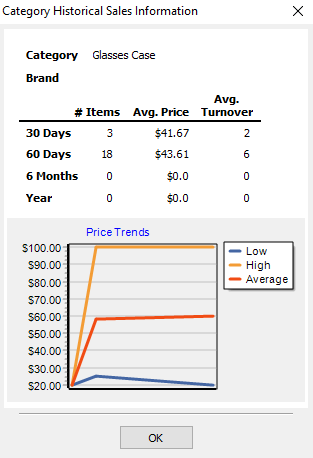
- F3 History : With the cursor in the price field, you can press the F3 button to get some basic sales information for this type of item. You will get a popup showing you the Category, Brand, a history of the items based on 30 Days, 60 Days, 6 Months, and a Year. For each of those time periods you will see how many you had in the store during that time, the average price, and the average turn over until the item sells. You will also get a price trend graph based on the price the previous items have been entered at.
Note: This is your base price. It does not include any fees such as items fees. - Retail Price : If desired, enter the Retail Price of an item as it would be found in a retail store. This price may be printed on the price tag.
Note: This is a great tool to show a potential buyer what the item cost when new if they are receiving a large discount. - Tag Quantity : Enter the number of tags you want printed for this item. The default is 1. You may want more than one tag if an item, such as a suit, has more than one piece.
- Item Fee : Use this field to enter an additional fee for the item. See the section on Price Code for information on Web Fees and Final Value Fees.
- Allow Donate : If this box is checked than it can be donated. If it is not checked then the item cannot be donated - an error message will appear in anyone attempts to donate the item in Post Sales. See also Define Default Information for Accounts and Additional Info for more information about defaults that control the donation of items.
- Quantity (on Hand) : This field displays how many of this particular item are in stock. By default the value is 1. If you have more then one of the same item, you can add a value greater than 1.
- Tax Code : The Tax Code defaults to the Tax Code assigned for each item's Category through Product Lines. See Categories Overview, Set up Tax Codes, and Set Up Product Lines, for more information.
An item's Tax Code may be changed by selecting a Tax Code from the drop-down list. - Tag Color : Tag colors may be used for any reason. Two common reasons are:
- Performing Automatic Markdowns based on tag color (see Set Up Automatic Markdowns by Tag Color for more information).
- Grouping inventory by tag color.
- Store Section : Use this optional field to identify where the item is located on the store floor. Store Sections must be set up ahead of time.
- Location : If you have multiple store locations, use this field to designate the current location of the item. An items location can also be changed through the Change Item Details menu. See Bulk Edit Items for more details.
- Custom (1-5) : Use these fields to track additional data, such as a bin (box) number, etc.
The Custom 1 field appears in the Picklist, and HTML tags are available for all custom fields for use in the Templates which are used for Auction Ads. Custom 1 can also be used for items that have barcodes. Entering the number barcode number in this field will allow you to find the item in the Point Of Sale by press U, then scanning the barcode. - Valuation : Used to enter an estimated value of an item when the actual value is not known or a value has a fluctuating after market value such as collectors items..
- ISBN (International Standard Book Number) : Standard numbering system for books. if you have this number and wish to record it, add it in this field.
- Weight : The Weight of the item
- Width : The Width of the item
- Length : The Length of the item
- Height : The Height of the item
- Key Words : Key Words work like Meta Tags. When an item is pushed to reCommerce, they are the words and phrases that searchers enter into search engines, also called “search queries” to find the items.
- Image Column : The image column is where you can add images to an item.

Next Article In Section
Click the following link to move to the next article in this section:
Add a Consigned Item