Table of Contents
Item Change History
The Item Change History dialog allows you to view a history of changes to the Price, Location, Cost, and Price Code fields of an account’s items.
To access the Item Change History dialog:

- Ensure you are on the Account List tab in Liberty by clicking on the Account List tab
- If the Account List tab has been closed, you can click the Account List button near the top of the Inventory Module’s window.
- Double-click the line entry for the account you wish to view the Item Change History for.
Once the desired account has been opened:
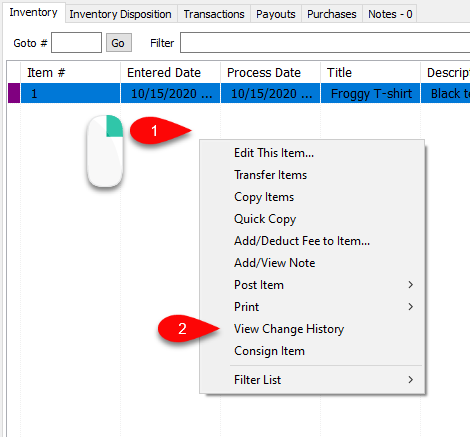
- In the account’s Inventory tab, Right-Click anywhere in the inventory list
- Then click View Item History.

Then the Item Change History dialog will appear. Here we can see all items that have had their Price, Location, Cost, and Price Code fields changed at any point in time. The various columns can also be sorted by clicking the desired column’s header.

Next Section Navigation Link
Click the following link to see a list of articles for the next section:
One of a Kind Items