Table of Contents
Looking for Wishlist Matches While Adding Items
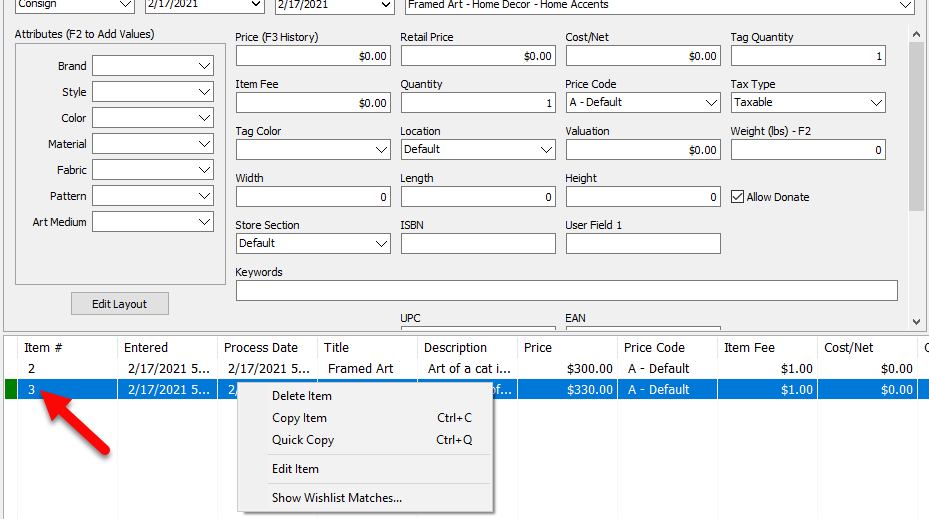
When an item is added to inventory that matches a wished for item, the far left side columns will have a green indicator, Just to the left of the Item Number Column.
To View A Wish List Match In The Item Entry Grid
- Right-click on any item with the green indicator showing that it has a possible Wish List match.
- Select Show Wish List Matches.
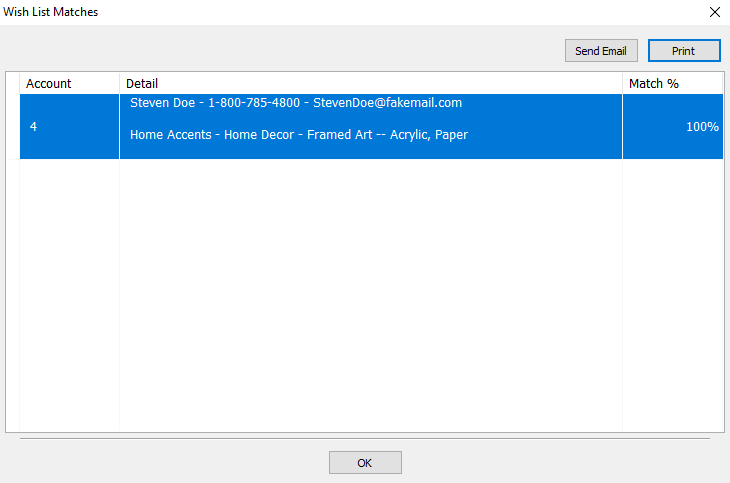
- The Wish List Matches screen will appear showing matches. It will display the Account, the Detail of the customer, and the Match % of how much the item is matched to this customer


Next Article In Section
Click the following link to move to the next article in this section:
Wishlist Cross-Reference report
Related Topics
Looking for Wishlist Matches While Adding Items Wishlist Overview Find an Item (in any account) Using Item Lookup Using the Wishlist Wishlist Cross-Reference report Find an Item from within an Account Finding Items with a Status of Needs Info Adding A Consignment Drop-Off Adding Items To A Consignment Drop-Off Dropoff List View Editing A Consignment Drop-Off