Table of Contents
View a History of Account purchases
To View A History Of Purchases Made By A Particular Client
- Click on the Purchases tab. The Purchase History screen will display.
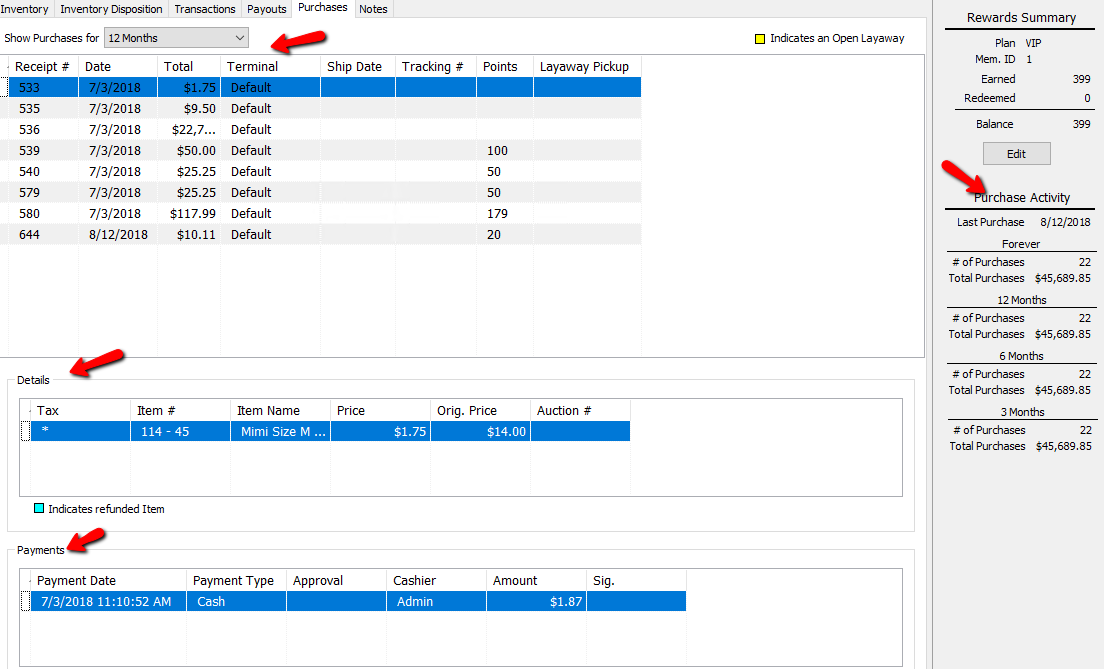
- On the right hand side, you will also find a customer’s Purchase Activity. This menu contains a customer Last Purchase, and Number of Purchases.
Explanation Of The Different Fields- Show Purchases For : Select the time period for which you wish to view purchases by selecting from the Show Purchases For drop-down menu.
- Receipt # : Shows the receipt number for that purchase.
- Date : Date of the Purchase.
- Total : Total of all items for that purchase.
- Terminal : The identification of the terminal in the store from which this transaction transpired.
- Ship Date : If this item was shipped, the date of that shipment will populate here.
- Tracking Number : If the item was shipped, and a tracking number was entered into Liberty, it will display here.
- Points : If the customer is part of a rewards plan, the amount of points earned will be displayed here for that purchase.
- Layaway Pickup : Layaway Pickup is the date it's the Layaway is to be picked up by, based on the layaway period set in POS.
- # Of Purchases : Total number of purchases the customer has made.
- Total Purchases : Total amount spent in purchases.
- Last Purchase : The last date a purchase was made for this account.


Note: Any Purchase highlighted in Yellow indicates an open Layaway.

Details Section
- The Details section will give you the information for each purchase. Simply highlight the purchase above to review the details in the Details section.
- Tax : A Star (*) in this field indicates tax was assessed on this purchase.
- Item Number : Account-Item number of the item sold for that purchase.
- Item Name : Name associated with the item purchased.
- Price : Price the item sold for during that purchase.
- Original Price : Original price the item was listed for.
- Auction Number : If the item was associated with an auction, the Auction Number will be displayed here.
Note: Any items listed in this section in blue, are items that have been refunded.

Payments Section
- Payment Date : Date the payments were made for the purchase.
- Payment Type : Method used to make the purchase.
- Approval : If the customer has integrated credit card processing, and the Purchase was paid for with a credit card, the approval code from the processor will be here.
- Cashier : Name of the cashier that processed the purchase.
- Amount : The amount with tax paid in this purchase.
- Sig. : A Star (*) in this field indicates a signature was captured on this purchase. the signature can be viewed by double clicking on this field.
Next Article In Section
Click the following link to move to the next article in this section:
Deactivating an Account
Related Topics
View a History of Account purchases Track Sales by Customer Add Notes to an Account Add Multiple Addresses and Phone numbers Apply Group Deductions Bulk Change Default Price Code Using the Client Import and Export Utility Creating New and Maintaining Existing Accounts Customize the Account Detail Window Deactivating an Account Delete a Client's Data From Consignor Login