Table of Contents
Reactivating Accounts In Bulk
The Reactivate Accounts tool in Liberty REACT allows you to reactivate any number of accounts at once in bulk, in an easy to use interface.
To access the tool, in the Inventory Module go to Activities > Inventory > Reactivate Accounts….

Then the Bulk Reactivate Account dialog will appear.

- Deactivation Date : Specifies the date to search for deactivated accounts.
- Account List : Shows all the accounts deactivated on the date specified in the previous step. You can select/deselect the desired accounts to be reactivated by clicking on them in the list.
- Reactivate Selected : Reactivates the accounts selected in the Account List, if any.
- Reactivate All : Reactivates all accounts shown in the Account List, if any.
Once you have selected an option to reactivate the desired accounts, you will get a confirmation dialog.
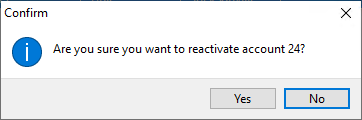
- Yes : Reactivates the desired accounts immediately.
- No : Cancels reactivation of the selected accounts and returns you to the Liberty Inventory Module.

Next Article In Section
Click the following link to move to the next article in this section:
Bulk Change Default Price Code
Related Topics
Reactivating Accounts In Bulk Deactivating an Account Reactivating an Account Look Up An Account Add Notes to an Account Add Multiple Addresses and Phone numbers Apply Group Deductions Bulk Change Default Price Code Using the Client Import and Export Utility Creating New and Maintaining Existing Accounts Customize the Account Detail Window